- Category without a name
- EX-A Export Declaration
EX-A Export Declaration: What It Is and Why You Need It to Export a Car from the EU
What is the EX-A, how it proves a car left the EU, and how the VAT deposit works in an export sale.
Quick facts
What is the EX-A?
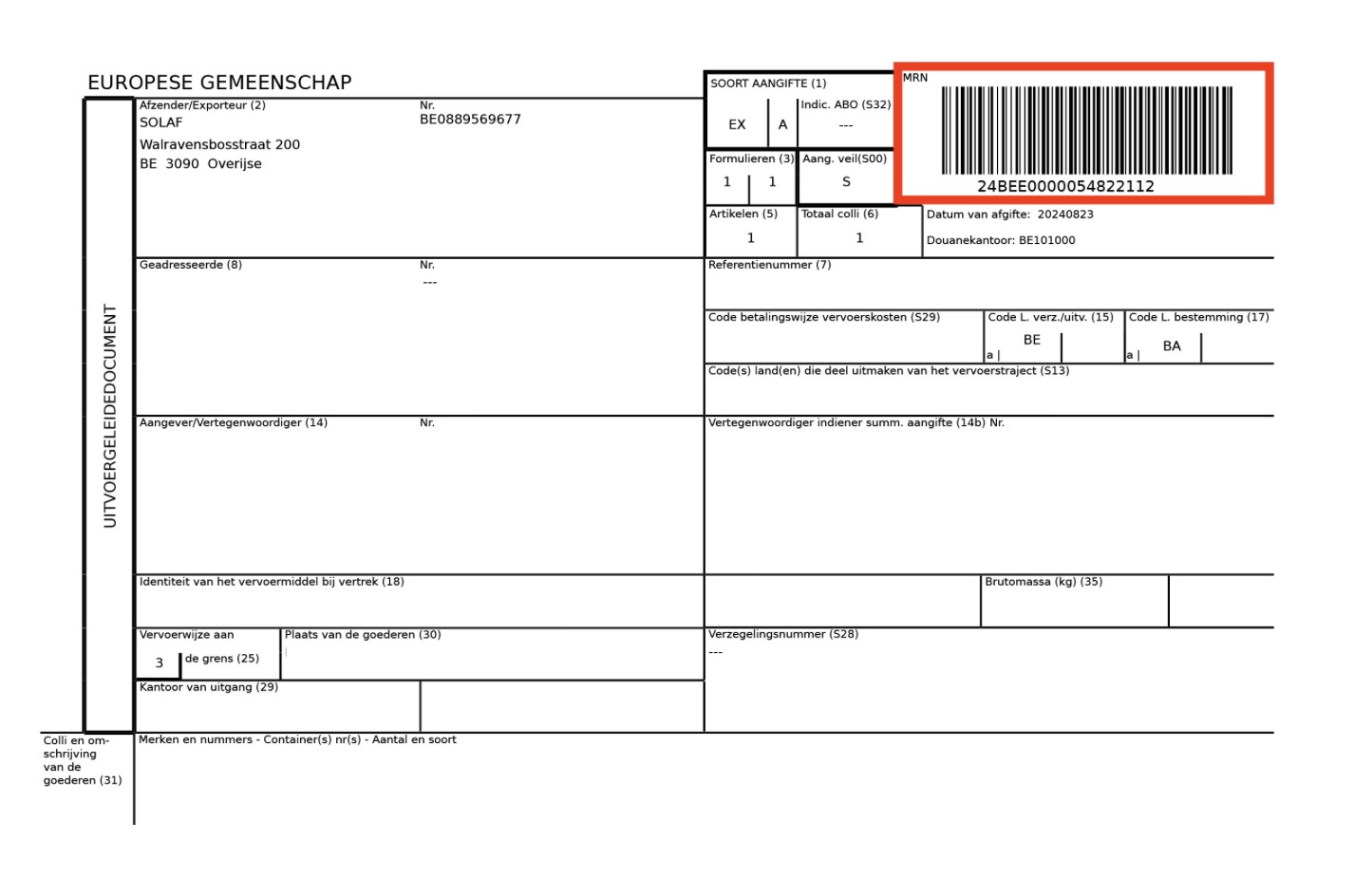
The EX-A is the EU customs export declaration for goods leaving the customs territory of the EU. It is also called the Export Accompanying Document (EAD). For a car dealer, it is the document they need to clear customs when exporting a vehicle out of the EU.
The declaration is filed online in the AES (Automated Export System). This process generates a Movement Reference Number (MRN), which tracks the car until it leaves the EU.
EX-A is needed for export of cars made in the EU to a country outside of the EU, or cars that already cleared EU customs and are now leaving again.
| Document | What does it prove? | When do you need it? |
|---|---|---|
| EX-A export declaration | Proves that the car left the EU customs territory. | For every export of a car out of the EU. |
| EUR1 certificate | Proves where the car was made. This can lower or remove import duty in the destination country. | For exports to a country with an EU trade agreement, depending on the car brand. |
| Certificate of Origin | Proves where the car was made, issued by the manufacturer. | Sometimes accepted instead of the EUR1 certificate. |
The MRN and proof of export
The MRN (Movement Reference Number) is the number AES gives your EX-A as soon as it is filed. It tracks the car until the last EU border crossing before exiting the EU.
Once the car actually leaves, the border office confirms this, and AES generates a Confirmation of Exit. This confirmation, not the EX-A, is your proof of export. It's what you can use to recover your VAT deposit.
What is the VAT deposit?
A VAT deposit is needed for all export sales - when you buy a car from the EU as a non-EU buyer.
It is charged at the VAT rate of the seller's country, for example 21% when purchasing a car from Belgium.
Once the export is completed and the EX-A export document has been officially registered with EU customs, you can request a VAT deposit refund from the seller (not the customs!).
Who files the EX-A?
The exporter, or their customs agent, files the EX-A. However, in practice, the seller often files it for the buyer.
How does the EX-A fit into the export process?
In short: after you purchase a car, the seller files the EX-A. The car travels to the last EU border, and the border office confirms the car has left the EU.
Here is the entire process step by step:
- Purchase the vehicle and organize the transport.
- Report the last EU border crossing to the seller (at eCarsTrade, this is done through your Personal Page).
- Pay a VAT deposit to the seller (charged at the VAT rate of the seller’s country).
- The seller files the EX-A export declaration, which generates the MRN.
- Once the vehicle has crossed into non-EU territory, the AES issues the Confirmation of Exit.
- Keep the Confirmation of Exit as proof of export, then reclaim your VAT deposit.
Exporting cars out of the EU?
When you buy vehicles through eCarsTrade, our team helps you with the export process.
- Direct access to used cars from across Europe
- Clear vehicle data and documents for export
- EX-A export declaration request
- A dedicated Account manager for your account
- Guidance on the MRN and the Confirmation of Exit
- Support that keeps the customs and VAT steps in order
Sources
We sourced this information from EU customs resources, the Union Customs Code, national customs export resources, and operational experience processing vehicle exports out of the EU.
- European Commission — Taxation and Customs Union: the AES (Automated Export System) and UCC export formalities. taxation-customs.ec.europa.eu Accessed June 2026
- EUR-Lex — Union Customs Code, Regulation (EU) 952/2013, export provisions. eur-lex.europa.eu Accessed June 2026
- National customs export declaration guidance (Belgium, the Netherlands, Germany). taxation-customs.ec.europa.eu Accessed June 2026

